| | |
|---|
| | | # FunASR-1.x.x 注册模型教程 |
|---|
| | | # FunASR-1.x.x 注册新模型教程 |
|---|
| | | |
|---|
| | | 1.0版本的设计初衷是【**让模型集成更简单**】,核心feature为注册表与AutoModel: |
|---|
| | | (简体中文|[English](./Tables.md)) |
|---|
| | | |
|---|
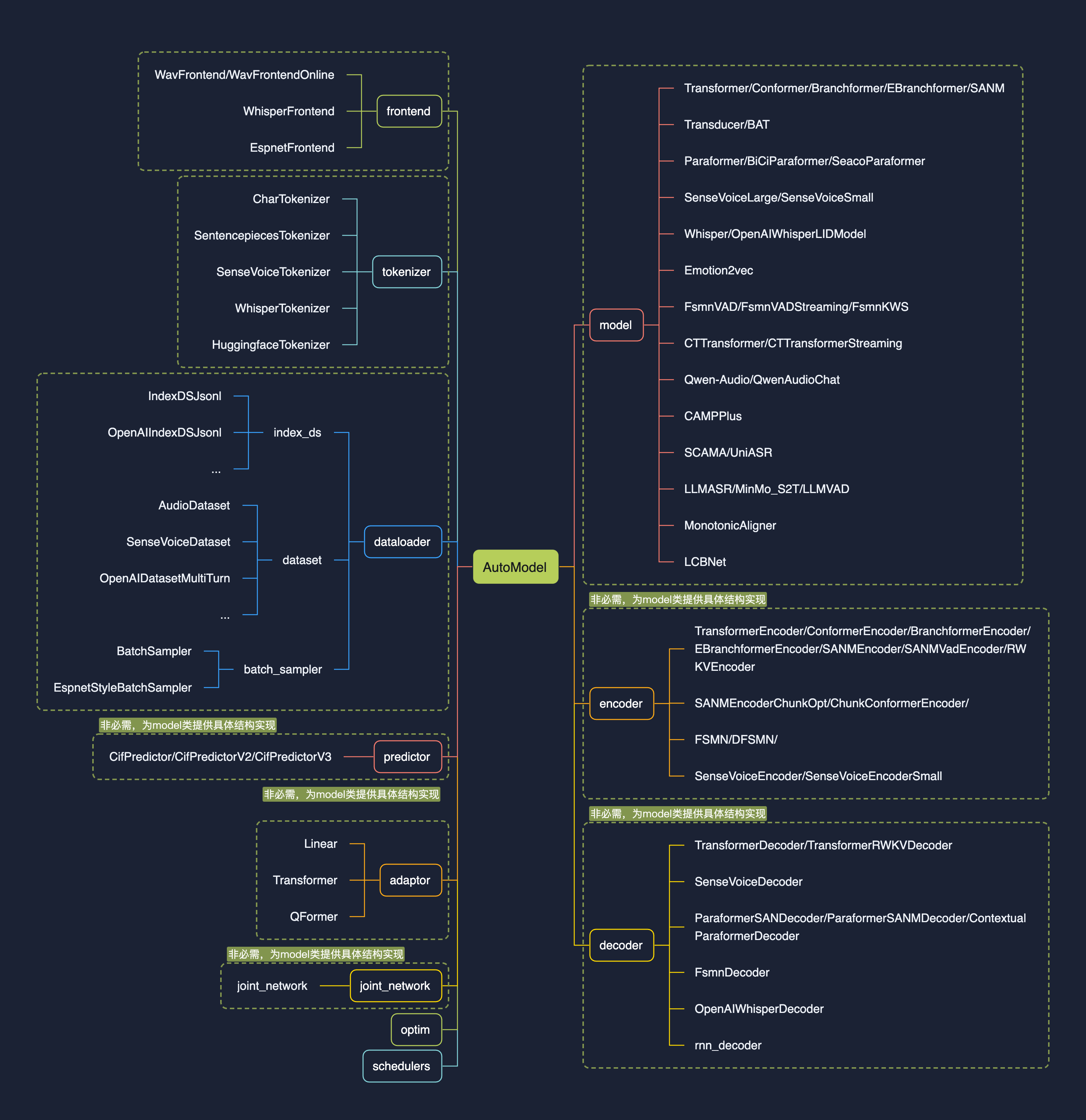
| | | funasr-1.x.x 版本的设计初衷是【**让模型集成更简单**】,核心feature为注册表与AutoModel: |
|---|
| | | |
|---|
| | | * 注册表的引入,使得开发中可以用搭积木的方式接入模型,兼容多种task; |
|---|
| | | |
|---|
| | | * 新设计的AutoModel接口,统一modelscope、huggingface与funasr推理与训练接口,支持自由选择下载仓库; |
|---|
| | | |
|---|
| | | * 支持模型导出,demo级别服务部署,以及工业级别多并发服务部署; |
|---|
| | | |
|---|
| | | * 统一学术与工业模型推理训练脚本; |
|---|
| | | |
|---|
| | | |
|---|
| | |  |
|---|
| | | * 新设计的AutoModel接口,统一modelscope、huggingface与funasr推理与训练接口,支持自由选择下载仓库; |
|---|
| | | |
|---|
| | | * 支持模型导出,demo级别服务部署,以及工业级别多并发服务部署; |
|---|
| | | |
|---|
| | | * 统一学术与工业模型推理训练脚本; |
|---|
| | | |
|---|
| | | |
|---|
| | | # 快速上手 |
|---|
| | | |
|---|
| | | ## 基于automodel用法 |
|---|
| | | |
|---|
| | | ### Paraformer模型 |
|---|
| | | |
|---|
| | | 输入任意时长语音,输出为语音内容对应文字,文字具有标点断句,字级别时间戳,以及说话人身份。 |
|---|
| | | |
|---|
| | | ```python |
|---|
| | | from funasr import AutoModel |
|---|
| | | |
|---|
| | | model = AutoModel(model="paraformer-zh", |
|---|
| | | vad_model="fsmn-vad", |
|---|
| | | vad_kwargs={"max_single_segment_time": 60000}, |
|---|
| | | punc_model="ct-punc", |
|---|
| | | # spk_model="cam++" |
|---|
| | | ) |
|---|
| | | wav_file = f"{model.model_path}/example/asr_example.wav" |
|---|
| | | res = model.generate(input=wav_file, batch_size_s=300, batch_size_threshold_s=60, hotword='魔搭') |
|---|
| | | print(res) |
|---|
| | | ``` |
|---|
| | | |
|---|
| | | ### SenseVoiceSmall模型 |
|---|
| | | |
|---|
| | |
|---|
| | | ``` |
|---|
| | | |
|---|
| | | * `model`(str): [模型仓库](https://github.com/alibaba-damo-academy/FunASR/tree/main/model_zoo) 中的模型名称,或本地磁盘中的模型路径 |
|---|
| | | |
|---|
| | | |
|---|
| | | * `device`(str): `cuda:0`(默认gpu0),使用 GPU 进行推理,指定。如果为`cpu`,则使用 CPU 进行推理 |
|---|
| | | |
|---|
| | | |
|---|
| | | * `ncpu`(int): `4` (默认),设置用于 CPU 内部操作并行性的线程数 |
|---|
| | | |
|---|
| | | |
|---|
| | | * `output_dir`(str): `None` (默认),如果设置,输出结果的输出路径 |
|---|
| | | |
|---|
| | | |
|---|
| | | * `batch_size`(int): `1` (默认),解码时的批处理,样本个数 |
|---|
| | | |
|---|
| | | |
|---|
| | | * `hub`(str):`ms`(默认),从modelscope下载模型。如果为`hf`,从huggingface下载模型。 |
|---|
| | | |
|---|
| | | |
|---|
| | | * `**kwargs`(dict): 所有在`config.yaml`中参数,均可以直接在此处指定,例如,vad模型中最大切割长度 `max_single_segment_time=6000` (毫秒)。 |
|---|
| | | |
|---|
| | | |
|---|
| | | |
|---|
| | | #### AutoModel 推理 |
|---|
| | | |
|---|
| | |
|---|
| | | ``` |
|---|
| | | |
|---|
| | | * * wav文件路径, 例如: asr\_example.wav |
|---|
| | | |
|---|
| | | |
|---|
| | | * pcm文件路径, 例如: asr\_example.pcm,此时需要指定音频采样率fs(默认为16000) |
|---|
| | | |
|---|
| | | |
|---|
| | | * 音频字节数流,例如:麦克风的字节数数据 |
|---|
| | | |
|---|
| | | |
|---|
| | | * wav.scp,kaldi 样式的 wav 列表 (`wav_id \t wav_path`), 例如: |
|---|
| | | |
|---|
| | | |
|---|
| | | |
|---|
| | | ```plaintext |
|---|
| | | asr_example1 ./audios/asr_example1.wav |
|---|
| | |
|---|
| | | 在这种输入 |
|---|
| | | |
|---|
| | | * 音频采样点,例如:`audio, rate = soundfile.read("asr_example_zh.wav")`, 数据类型为 numpy.ndarray。支持batch输入,类型为list: `[audio_sample1, audio_sample2, ..., audio_sampleN]` |
|---|
| | | |
|---|
| | | |
|---|
| | | * fbank输入,支持组batch。shape为\[batch, frames, dim\],类型为torch.Tensor,例如 |
|---|
| | | |
|---|
| | | |
|---|
| | | * `output_dir`: None (默认),如果设置,输出结果的输出路径 |
|---|
| | | |
|---|
| | | |
|---|
| | | * `**kwargs`(dict): 与模型相关的推理参数,例如,`beam_size=10`,`decoding_ctc_weight=0.1`。 |
|---|
| | | |
|---|
| | | |
|---|
| | | |
|---|
| | | 详细文档链接:[https://github.com/modelscope/FunASR/blob/main/examples/README\_zh.md](https://github.com/modelscope/FunASR/blob/main/examples/README_zh.md) |
|---|
| | | |
|---|
| | | # 注册表详解 |
|---|
| | | |
|---|
| | | 以SenseVoiceSmall模型为例,讲解如何注册新模型,模型链接: |
|---|
| | | |
|---|
| | | **modelscope:**[https://www.modelscope.cn/models/iic/SenseVoiceSmall/files](https://www.modelscope.cn/models/iic/SenseVoiceSmall/files) |
|---|
| | | |
|---|
| | | **huggingface:**[https://huggingface.co/FunAudioLLM/SenseVoiceSmall](https://huggingface.co/FunAudioLLM/SenseVoiceSmall) |
|---|
| | | |
|---|
| | | ## 模型资源目录 |
|---|
| | | |
|---|
| | |  |
|---|
| | | |
|---|
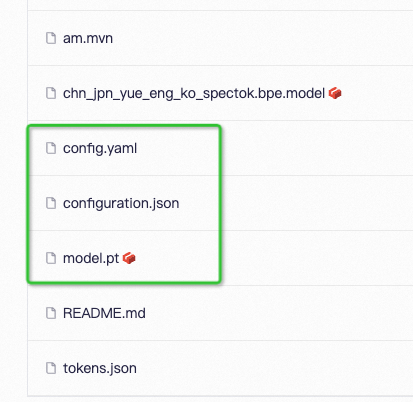
| | | **模型链接为:**[https://www.modelscope.cn/models/iic/SenseVoiceSmall/files](https://www.modelscope.cn/models/iic/SenseVoiceSmall/files) |
|---|
| | | |
|---|
| | | **配置文件**:config.yaml |
|---|
| | | |
|---|
| | |
|---|
| | | pos_enc_class: SinusoidalPositionEncoder |
|---|
| | | normalize_before: true |
|---|
| | | kernel_size: 11 |
|---|
| | | sanm_shfit: 0 |
|---|
| | | sanm_shift: 0 |
|---|
| | | selfattention_layer_type: sanm |
|---|
| | | |
|---|
| | | |
|---|
| | |
|---|
| | | |
|---|
| | | **模型参数**:model.pt |
|---|
| | | |
|---|
| | | **路径解析**:configuration.json |
|---|
| | | **路径解析**:configuration.json(非必需) |
|---|
| | | |
|---|
| | | ```json |
|---|
| | | { |
|---|
| | |
|---|
| | | "model": {"type" : "funasr"}, |
|---|
| | | "pipeline": {"type":"funasr-pipeline"}, |
|---|
| | | "model_name_in_hub": { |
|---|
| | | "ms":"", |
|---|
| | | "ms":"", |
|---|
| | | "hf":""}, |
|---|
| | | "file_path_metas": { |
|---|
| | | "init_param":"model.pt", |
|---|
| | | "init_param":"model.pt", |
|---|
| | | "config":"config.yaml", |
|---|
| | | "tokenizer_conf": {"bpemodel": "chn_jpn_yue_eng_ko_spectok.bpe.model"}, |
|---|
| | | "frontend_conf":{"cmvn_file": "am.mvn"}} |
|---|
| | | } |
|---|
| | | ``` |
|---|
| | | |
|---|
| | | configuration.json的作用是给file\_path\_metas中的item拼接上模型根目录,以便于路径能够被正确的解析,以上为例,假设模型根目录为:/home/zhifu.gzf/init\_model/SenseVoiceSmall,目录中config.yaml中的相关路径被替换成了正确的路径(忽略无关配置): |
|---|
| | | |
|---|
| | | ```yaml |
|---|
| | | init_param: /home/zhifu.gzf/init_model/SenseVoiceSmall/model.pt |
|---|
| | | |
|---|
| | | tokenizer_conf: |
|---|
| | | bpemodel: /home/zhifu.gzf/init_model/SenseVoiceSmall/chn_jpn_yue_eng_ko_spectok.bpe.model |
|---|
| | | |
|---|
| | | frontend_conf: |
|---|
| | | cmvn_file: /home/zhifu.gzf/init_model/SenseVoiceSmall/am.mvn |
|---|
| | | ``` |
|---|
| | | |
|---|
| | | ## 注册表 |
|---|
| | | |
|---|
| | |  |
|---|
| | | |
|---|
| | | ### 查看注册表 |
|---|
| | | |
|---|
| | |
|---|
| | | tables.print() |
|---|
| | | ``` |
|---|
| | | |
|---|
| | | 支持查看指定类型的注册表:\`tables.print("model")\` |
|---|
| | | 支持查看指定类型的注册表:\`tables.print("model")\`,目前funasr已经注册模型如上图所示。目前预先定义了如下几个分类: |
|---|
| | | |
|---|
| | | ```python |
|---|
| | | model_classes = {} |
|---|
| | | frontend_classes = {} |
|---|
| | | specaug_classes = {} |
|---|
| | | normalize_classes = {} |
|---|
| | | encoder_classes = {} |
|---|
| | | decoder_classes = {} |
|---|
| | | joint_network_classes = {} |
|---|
| | | predictor_classes = {} |
|---|
| | | stride_conv_classes = {} |
|---|
| | | tokenizer_classes = {} |
|---|
| | | dataloader_classes = {} |
|---|
| | | batch_sampler_classes = {} |
|---|
| | | dataset_classes = {} |
|---|
| | | index_ds_classes = {} |
|---|
| | | ``` |
|---|
| | | |
|---|
| | | ### 注册模型 |
|---|
| | | |
|---|
| | |
|---|
| | | def forward( |
|---|
| | | self, |
|---|
| | | **kwargs, |
|---|
| | | ): |
|---|
| | | ): |
|---|
| | | |
|---|
| | | def inference( |
|---|
| | | self, |
|---|
| | |
|---|
| | | |
|---|
| | | ``` |
|---|
| | | |
|---|
| | | 在需要注册的类名前加上 `@tables.register("model_classes","SenseVoiceSmall")`,即可完成注册,类需要实现有:__init__,forward,inference方法。 |
|---|
| | | 在需要注册的类名前加上 @tables.register("model\_classes", "SenseVoiceSmall"),即可完成注册,类需要实现有:\_\_init\_\_,forward,inference方法。 |
|---|
| | | |
|---|
| | | register用法: |
|---|
| | | |
|---|
| | | ```python |
|---|
| | | @tables.register("注册分类", "注册名") |
|---|
| | | ``` |
|---|
| | | |
|---|
| | | 其中,"注册分类"可以是预先定义好的分类(见上面图),如果是自己定义的新分类,会自动将新分类写进注册表分类中,"注册名"即希望注册名字,后续可以直接来使用。 |
|---|
| | | |
|---|
| | | 完整代码:[https://github.com/modelscope/FunASR/blob/main/funasr/models/sense\_voice/model.py#L443](https://github.com/modelscope/FunASR/blob/main/funasr/models/sense_voice/model.py#L443) |
|---|
| | | |
|---|
| | |
|---|
| | | ... |
|---|
| | | ``` |
|---|
| | | |
|---|
| | | ### 注册失败 |
|---|
| | | |
|---|
| | | 如果出现找不到注册模型或发方法,assert model\_class is not None, f'{kwargs\["model"\]} is not registered'。模型注册的原理是,import 模型文件,可以通过import来查看具体注册失败原因,例如,上述模型文件为,funasr/models/sense\_voice/model.py: |
|---|
| | | |
|---|
| | | ```python |
|---|
| | | from funasr.models.sense_voice.model import * |
|---|
| | | ``` |
|---|
| | | |
|---|
| | | ## 注册原则 |
|---|
| | | |
|---|
| | | * Model:模型之间互相独立,每一个模型,都需要在funasr/models/下面新建一个模型目录,不要采用类的继承方法!!!不要从其他模型目录中import,所有需要用到的都单独放到自己的模型目录中!!!不要修改现有的模型代码!!! |
|---|
| | | |
|---|
| | | |
|---|
| | | * dataset,frontend,tokenizer,如果能复用现有的,直接复用,如果不能复用,请注册一个新的,再修改,不要修改原来的!!! |
|---|
| | | |
|---|
| | | |
|---|
| | | |
|---|
| | | # 独立仓库 |
|---|
| | | |
|---|
| | |
|---|
| | | # trust_remote_code:`True` 表示 model 代码实现从 `remote_code` 处加载,`remote_code` 指定 `model` 具体代码的位置(例如,当前目录下的 `model.py`),支持绝对路径与相对路径,以及网络 url。 |
|---|
| | | model = AutoModel( |
|---|
| | | model="iic/SenseVoiceSmall", |
|---|
| | | trust_remote_code=True, |
|---|
| | | remote_code="./model.py", |
|---|
| | | trust_remote_code=True, |
|---|
| | | remote_code="./model.py", |
|---|
| | | ) |
|---|
| | | ``` |
|---|
| | | |
|---|
| | |
|---|
| | | print(text) |
|---|
| | | ``` |
|---|
| | | |
|---|
| | | 微调参考:[https://github.com/FunAudioLLM/SenseVoice/blob/main/finetune.sh](https://github.com/FunAudioLLM/SenseVoice/blob/main/finetune.sh) |
|---|
| | | 微调参考:[https://github.com/FunAudioLLM/SenseVoice/blob/main/finetune.sh](https://github.com/FunAudioLLM/SenseVoice/blob/main/finetune.sh) |
|---|


