| runtime/docs/SDK_advanced_guide_offline.md | ●●●●● 补丁 | 查看 | 原始文档 | blame | 历史 | |
| runtime/docs/SDK_advanced_guide_offline_en.md | ●●●●● 补丁 | 查看 | 原始文档 | blame | 历史 | |
| runtime/docs/SDK_advanced_guide_offline_en_zh.md | ●●●●● 补丁 | 查看 | 原始文档 | blame | 历史 | |
| runtime/docs/SDK_advanced_guide_offline_zh.md | ●●●●● 补丁 | 查看 | 原始文档 | blame | 历史 | |
| runtime/docs/SDK_advanced_guide_online.md | ●●●●● 补丁 | 查看 | 原始文档 | blame | 历史 | |
| runtime/docs/SDK_advanced_guide_online_zh.md | ●●●●● 补丁 | 查看 | 原始文档 | blame | 历史 | |
| runtime/docs/images/offline_structure.jpg | 补丁 | 查看 | 原始文档 | blame | 历史 |
runtime/docs/SDK_advanced_guide_offline.md
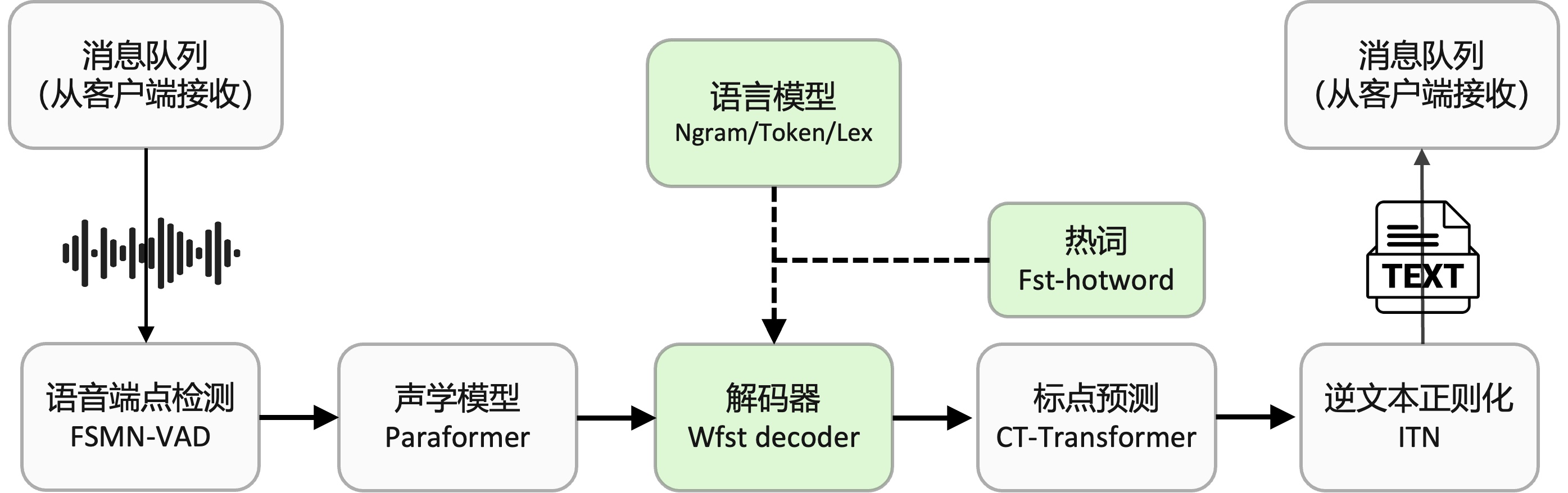
@@ -3,38 +3,19 @@ FunASR provides a Chinese offline file transcription service that can be deployed locally or on a cloud server with just one click. The core of the service is the FunASR runtime SDK, which has been open-sourced. FunASR-runtime combines various capabilities such as speech endpoint detection (VAD), large-scale speech recognition (ASR) using Paraformer-large, and punctuation detection (PUNC), which have all been open-sourced by the speech laboratory of DAMO Academy on the Modelscope community. This enables accurate and efficient high-concurrency transcription of audio files. This document serves as a development guide for the FunASR offline file transcription service. If you wish to quickly experience the offline file transcription service, please refer to the one-click deployment example for the FunASR offline file transcription service ([docs](./SDK_tutorial.md)). <img src="docs/images/offline_structure.jpg" width="900"/> ## Installation of Docker The following steps are for manually installing Docker and Docker images. If your Docker image has already been launched, you can ignore this step. ### Installation of Docker environment ## Quick start ### Docker install If you have already installed Docker, ignore this step! ```shell # Ubuntu: curl -fsSL https://test.docker.com -o test-docker.sh sudo sh test-docker.sh # Debian: curl -fsSL https://get.docker.com -o get-docker.sh sudo sh get-docker.sh # CentOS: curl -fsSL https://get.docker.com | bash -s docker --mirror Aliyun # MacOS: brew install --cask --appdir=/Applications docker curl -O https://isv-data.oss-cn-hangzhou.aliyuncs.com/ics/MaaS/ASR/shell/install_docker.sh; sudo bash install_docker.sh ``` More details could ref to [docs](https://alibaba-damo-academy.github.io/FunASR/en/installation/docker.html) ### Starting Docker ```shell sudo systemctl start docker ``` If you do not have Docker installed, please refer to [Docker Installation](https://alibaba-damo-academy.github.io/FunASR/en/installation/docker.html) ### Pulling and launching images Use the following command to pull and launch the Docker image for the FunASR runtime-SDK: ```shell sudo docker pull registry.cn-hangzhou.aliyuncs.com/funasr_repo/funasr:funasr-runtime-sdk-cpu-0.3.0 @@ -46,11 +27,9 @@ -p <host port>:<mapped docker port>: In the example, host machine (ECS) port 10095 is mapped to port 10095 in the Docker container. Make sure that port 10095 is open in the ECS security rules. -v <host path>:<mounted Docker path>: In the example, the host machine path /root is mounted to the Docker path /workspace/models. ``` ## Starting the server ### Starting the server Use the flollowing script to start the server : ```shell nohup bash run_server.sh \ @@ -59,7 +38,8 @@ --model-dir damo/speech_paraformer-large_asr_nat-zh-cn-16k-common-vocab8404-onnx \ --punc-dir damo/punc_ct-transformer_cn-en-common-vocab471067-large-onnx \ --lm-dir damo/speech_ngram_lm_zh-cn-ai-wesp-fst \ --itn-dir thuduj12/fst_itn_zh > log.out 2>&1 & --itn-dir thuduj12/fst_itn_zh \ --hotword /workspace/models/hotwords.txt > log.out 2>&1 & # If you want to close ssl,please add:--certfile 0 # If you want to deploy the timestamp or nn hotword model, please set --model-dir to the corresponding model: @@ -67,7 +47,6 @@ # damo/speech_paraformer-large-contextual_asr_nat-zh-cn-16k-common-vocab8404-onnx(hotword) # If you want to load hotwords on the server side, please configure the hotwords in the host machine file ./funasr-runtime-resources/models/hotwords.txt (docker mapping address: /workspace/models/hotwords.txt): # One hotword per line, format (hotword weight): 阿里巴巴 20" ``` ### More details about the script run_server.sh: @@ -92,7 +71,6 @@ ``` Introduction to run_server.sh parameters: ```text --download-model-dir: Model download address, download models from Modelscope by setting the model ID. --model-dir: Modelscope model ID. @@ -141,19 +119,14 @@ If you wish to deploy your fine-tuned model (e.g., 10epoch.pb), you need to manually rename the model to model.pb and replace the original model.pb in ModelScope. Then, specify the path as `model_dir`. ## Starting the client After completing the deployment of FunASR offline file transcription service on the server, you can test and use the service by following these steps. Currently, FunASR-bin supports multiple ways to start the client. The following are command-line examples based on python-client, c++-client, and custom client Websocket communication protocol: ### python-client ```shell python funasr_wss_client.py --host "127.0.0.1" --port 10095 --mode offline --audio_in "./data/wav.scp" --send_without_sleep --output_dir "./results" ``` Introduction to command parameters: ```text --host: the IP address of the server. It can be set to 127.0.0.1 for local testing. --port: the port number of the server listener. @@ -171,7 +144,6 @@ ``` Introduction to command parameters: ```text --server-ip: the IP address of the server. It can be set to 127.0.0.1 for local testing. --port: the port number of the server listener. @@ -182,19 +154,15 @@ ``` ### Custom client If you want to define your own client, see the [Websocket communication protocol](./websocket_protocol.md) ## How to customize service deployment The code for FunASR-runtime is open source. If the server and client cannot fully meet your needs, you can further develop them based on your own requirements: ### C++ client https://github.com/alibaba-damo-academy/FunASR/tree/main/runtime/websocket ### Python client https://github.com/alibaba-damo-academy/FunASR/tree/main/runtime/python/websocket ### C++ server @@ -218,7 +186,6 @@ FUNASR_RESULT result=FunOfflineInfer(asr_hanlde, wav_file.c_str(), RASR_NONE, NULL, 16000); // Where: asr_hanlde is the return value of FunOfflineInit, wav_file is the path to the audio file, and sampling_rate is the sampling rate (default 16k). ``` See the usage example for details, [docs](https://github.com/alibaba-damo-academy/FunASR/blob/main/runtime/onnxruntime/bin/funasr-onnx-offline.cpp) #### PUNC runtime/docs/SDK_advanced_guide_offline_en.md
@@ -4,43 +4,22 @@ This document serves as a development guide for the FunASR offline file transcription service. If you wish to quickly experience the offline file transcription service, please refer to the one-click deployment example for the FunASR offline file transcription service ([docs](./SDK_tutorial.md)). ## Installation of Docker The following steps are for manually installing Docker and Docker images. If your Docker image has already been launched, you can ignore this step. ### Installation of Docker environment ## Quick start ### Docker install If you have already installed Docker, ignore this step! ```shell # Ubuntu: curl -fsSL https://test.docker.com -o test-docker.sh sudo sh test-docker.sh # Debian: curl -fsSL https://get.docker.com -o get-docker.sh sudo sh get-docker.sh # CentOS: curl -fsSL https://get.docker.com | bash -s docker --mirror Aliyun # MacOS: brew install --cask --appdir=/Applications docker curl -O https://isv-data.oss-cn-hangzhou.aliyuncs.com/ics/MaaS/ASR/shell/install_docker.sh; sudo bash install_docker.sh ``` More details could ref to [docs](https://alibaba-damo-academy.github.io/FunASR/en/installation/docker.html) ### Starting Docker ```shell sudo systemctl start docker ``` If you do not have Docker installed, please refer to [Docker Installation](https://alibaba-damo-academy.github.io/FunASR/en/installation/docker.html) ### Pulling and launching images Use the following command to pull and launch the Docker image for the FunASR runtime-SDK: ```shell sudo docker pull registry.cn-hangzhou.aliyuncs.com/funasr_repo/funasr:funasr-runtime-sdk-en-cpu-0.1.1 sudo docker run -p 10097:10095 -it --privileged=true -v /root:/workspace/models registry.cn-hangzhou.aliyuncs.com/funasr_repo/funasr:funasr-runtime-sdk-en-cpu-0.1.1 ``` Introduction to command parameters: ```text -p <host port>:<mapped docker port>: In the example, host machine (ECS) port 10097 is mapped to port 10095 in the Docker container. Make sure that port 10097 is open in the ECS security rules. @@ -49,9 +28,7 @@ ``` ## Starting the server ### Starting the server Use the flollowing script to start the server : ```shell nohup bash run_server.sh \ @@ -61,11 +38,9 @@ --punc-dir damo/punc_ct-transformer_cn-en-common-vocab471067-large-onnx > log.out 2>&1 & # If you want to close ssl,please add:--certfile 0 ``` ### More details about the script run_server.sh: The funasr-wss-server supports downloading models from Modelscope. You can set the model download address (--download-model-dir, default is /workspace/models) and the model ID (--model-dir, --vad-dir, --punc-dir). Here is an example: ```shell @@ -83,7 +58,6 @@ ``` Introduction to run_server.sh parameters: ```text --download-model-dir: Model download address, download models from Modelscope by setting the model ID. --model-dir: Modelscope model ID. runtime/docs/SDK_advanced_guide_offline_en_zh.md
@@ -17,7 +17,6 @@ ## 快速上手 ### docker安装 如果您已安装docker,忽略本步骤!! 通过下述命令在服务器上安装docker: @@ -25,11 +24,10 @@ curl -O https://isv-data.oss-cn-hangzhou.aliyuncs.com/ics/MaaS/ASR/shell/install_docker.sh; sudo bash install_docker.sh ``` docker安装失败请参考 [Docker Installation](https://alibaba-damo-academy.github.io/FunASR/en/installation/docker.html) ### 镜像启动 通过下述命令拉取并启动FunASR runtime-SDK的docker镜像: ```shell sudo docker pull \ registry.cn-hangzhou.aliyuncs.com/funasr_repo/funasr:funasr-runtime-sdk-en-cpu-0.1.1 @@ -38,7 +36,6 @@ -v $PWD/funasr-runtime-resources/models:/workspace/models \ registry.cn-hangzhou.aliyuncs.com/funasr_repo/funasr:funasr-runtime-sdk-en-cpu-0.1.1 ``` 如果您没有安装docker,可参考[Docker安装](#Docker安装) ### 服务端启动 @@ -67,33 +64,6 @@ ``` ------------------ ## Docker安装 下述步骤为手动安装docker环境的步骤: ### docker环境安装 ```shell # Ubuntu: curl -fsSL https://test.docker.com -o test-docker.sh sudo sh test-docker.sh # Debian: curl -fsSL https://get.docker.com -o get-docker.sh sudo sh get-docker.sh # CentOS: curl -fsSL https://get.docker.com | bash -s docker --mirror Aliyun # MacOS: brew install --cask --appdir=/Applications docker ``` 安装详见:https://alibaba-damo-academy.github.io/FunASR/en/installation/docker.html ### docker启动 ```shell sudo systemctl start docker ``` ## 客户端用法详解 在服务器上完成FunASR服务部署以后,可以通过如下的步骤来测试和使用离线文件转写服务。 @@ -155,8 +125,6 @@ ``` 详细可以参考文档([点击此处](../java/readme.md)) ## 服务端用法详解: ### 启动FunASR服务 @@ -212,14 +180,12 @@ --certfile 0 ``` 执行上述指令后,启动英文离线文件转写服务。如果模型指定为ModelScope中model id,会自动从MoldeScope中下载如下模型: [FSMN-VAD模型](https://www.modelscope.cn/models/damo/speech_fsmn_vad_zh-cn-16k-common-onnx/summary), [Paraformer-lagre模型](https://www.modelscope.cn/models/damo/speech_paraformer-large_asr_nat-en-16k-common-vocab10020-onnx/summary), [CT-Transformer标点预测模型](https://www.modelscope.cn/models/damo/punc_ct-transformer_cn-en-common-vocab471067-large-onnx/summary) 如果,您希望部署您finetune后的模型(例如10epoch.pb),需要手动将模型重命名为model.pb,并将原modelscope中模型model.pb替换掉,将路径指定为`model_dir`即可。 ## 如何定制服务部署 @@ -235,9 +201,6 @@ ### 自定义客户端: 如果您想定义自己的client,参考[websocket通信协议](./websocket_protocol_zh.md) ``` ### c++ 服务端:
@@ -3,6 +3,7 @@ FunASR提供可一键本地或者云端服务器部署的中文离线文件转写服务,内核为FunASR已开源runtime-SDK。FunASR-runtime结合了达摩院语音实验室在Modelscope社区开源的语音端点检测(VAD)、Paraformer-large语音识别(ASR)、标点检测(PUNC) 等相关能力,可以准确、高效的对音频进行高并发转写。 本文档为FunASR离线文件转写服务开发指南。如果您想快速体验离线文件转写服务,可参考[快速上手](#快速上手)。 <img src="docs/images/offline_structure.jpg" width="900"/> ## 服务器配置 @@ -25,6 +26,7 @@ curl -O https://isv-data.oss-cn-hangzhou.aliyuncs.com/ics/MaaS/ASR/shell/install_docker.sh; sudo bash install_docker.sh ``` docker安装失败请参考 [Docker Installation](https://alibaba-damo-academy.github.io/FunASR/en/installation/docker.html) ### 镜像启动 @@ -38,7 +40,6 @@ -v $PWD/funasr-runtime-resources/models:/workspace/models \ registry.cn-hangzhou.aliyuncs.com/funasr_repo/funasr:funasr-runtime-sdk-cpu-0.3.0 ``` 如果您没有安装docker,可参考[Docker安装](#Docker安装) ### 服务端启动 @@ -57,7 +58,7 @@ # 如果您想关闭ssl,增加参数:--certfile 0 # 如果您想使用时间戳或者nn热词模型进行部署,请设置--model-dir为对应模型: # damo/speech_paraformer-large-vad-punc_asr_nat-zh-cn-16k-common-vocab8404-onnx(时间戳) # damo/speech_paraformer-large-contextual_asr_nat-zh-cn-16k-common-vocab8404-onnx(热词) # damo/speech_paraformer-large-contextual_asr_nat-zh-cn-16k-common-vocab8404-onnx(nn热词) # 如果您想在服务端加载热词,请在宿主机文件./funasr-runtime-resources/models/hotwords.txt配置热词(docker映射地址为/workspace/models/hotwords.txt): # 每行一个热词,格式(热词 权重):阿里巴巴 20 ``` @@ -75,34 +76,6 @@ ```shell python3 funasr_wss_client.py --host "127.0.0.1" --port 10095 --mode offline --audio_in "../audio/asr_example.wav" ``` ------------------ ## Docker安装 下述步骤为手动安装docker环境的步骤: ### docker环境安装 ```shell # Ubuntu: curl -fsSL https://test.docker.com -o test-docker.sh sudo sh test-docker.sh # Debian: curl -fsSL https://get.docker.com -o get-docker.sh sudo sh get-docker.sh # CentOS: curl -fsSL https://get.docker.com | bash -s docker --mirror Aliyun # MacOS: brew install --cask --appdir=/Applications docker ``` 安装详见:https://alibaba-damo-academy.github.io/FunASR/en/installation/docker.html ### docker启动 ```shell sudo systemctl start docker ``` ## 客户端用法详解 @@ -142,7 +115,6 @@ ``` 命令参数说明: ```text --server-ip 为FunASR runtime-SDK服务部署机器ip,默认为本机ip(127.0.0.1),如果client与服务不在同一台服务器, 需要改为部署机器ip @@ -153,13 +125,11 @@ ``` ### Html网页版 在浏览器中打开 html/static/index.html,即可出现如下页面,支持麦克风输入与文件上传,直接进行体验 <img src="images/html.png" width="900"/> ### Java-client ```shell FunasrWsClient --host localhost --port 10095 --audio_in ./asr_example.wav --mode offline ``` @@ -233,6 +203,7 @@ 如果,您希望部署您finetune后的模型(例如10epoch.pb),需要手动将模型重命名为model.pb,并将原modelscope中模型model.pb替换掉,将路径指定为`model_dir`即可。 ------------------ ## 如何定制服务部署 @@ -248,9 +219,6 @@ ### 自定义客户端: 如果您想定义自己的client,参考[websocket通信协议](./websocket_protocol_zh.md) ``` ### c++ 服务端:
@@ -3,17 +3,22 @@ FunASR provides a real-time speech transcription service that can be easily deployed on local or cloud servers, with the FunASR runtime-SDK as the core. It integrates the speech endpoint detection (VAD), Paraformer-large non-streaming speech recognition (ASR), Paraformer-large streaming speech recognition (ASR), punctuation (PUNC), and other related capabilities open-sourced by the speech laboratory of DAMO Academy on the Modelscope community. The software package can perform real-time speech-to-text transcription, and can also accurately transcribe text at the end of sentences for high-precision output. The output text contains punctuation and supports high-concurrency multi-channel requests. ## Quick Start ### Pull Docker Image Use the following command to pull and start the FunASR software package docker image: ### Docker install If you have already installed Docker, ignore this step! ```shell sudo docker pull registry.cn-hangzhou.aliyuncs.com/funasr_repo/funasr:funasr-runtime-sdk-online-cpu-0.1.3 mkdir -p ./funasr-runtime-resources/models sudo docker run -p 10096:10095 -it --privileged=true -v $PWD/funasr-runtime-resources/models:/workspace/models registry.cn-hangzhou.aliyuncs.com/funasr_repo/funasr:funasr-runtime-sdk-online-cpu-0.1.3 curl -O https://isv-data.oss-cn-hangzhou.aliyuncs.com/ics/MaaS/ASR/shell/install_docker.sh; sudo bash install_docker.sh ``` If you do not have Docker installed, please refer to [Docker Installation](https://alibaba-damo-academy.github.io/FunASR/en/installation/docker.html) ### Pull Docker Image Use the following command to pull and start the FunASR software package docker image: ```shell sudo docker pull registry.cn-hangzhou.aliyuncs.com/funasr_repo/funasr:funasr-runtime-sdk-online-cpu-0.1.4 mkdir -p ./funasr-runtime-resources/models sudo docker run -p 10096:10095 -it --privileged=true -v $PWD/funasr-runtime-resources/models:/workspace/models registry.cn-hangzhou.aliyuncs.com/funasr_repo/funasr:funasr-runtime-sdk-online-cpu-0.1.4 ``` ### Launching the Server After Docker is launched, start the funasr-wss-server-2pass service program: runtime/docs/SDK_advanced_guide_online_zh.md
@@ -11,23 +11,22 @@ 如果您已安装docker,忽略本步骤!! 通过下述命令在服务器上安装docker: ```shell curl -O https://isv-data.oss-cn-hangzhou.aliyuncs.com/ics/MaaS/ASR/shell/install_docker.sh; curl -O https://isv-data.oss-cn-hangzhou.aliyuncs.com/ics/MaaS/ASR/shell/install_docker.sh sudo bash install_docker.sh ``` docker安装失败请参考 [Docker Installation](https://alibaba-damo-academy.github.io/FunASR/en/installation/docker.html) ### 镜像启动 通过下述命令拉取并启动FunASR软件包的docker镜像: ```shell sudo docker pull \ registry.cn-hangzhou.aliyuncs.com/funasr_repo/funasr:funasr-runtime-sdk-online-cpu-0.1.3 registry.cn-hangzhou.aliyuncs.com/funasr_repo/funasr:funasr-runtime-sdk-online-cpu-0.1.4 mkdir -p ./funasr-runtime-resources/models sudo docker run -p 10096:10095 -it --privileged=true \ -v $PWD/funasr-runtime-resources/models:/workspace/models \ registry.cn-hangzhou.aliyuncs.com/funasr_repo/funasr:funasr-runtime-sdk-online-cpu-0.1.3 registry.cn-hangzhou.aliyuncs.com/funasr_repo/funasr:funasr-runtime-sdk-online-cpu-0.1.4 ``` 如果您没有安装docker,可参考[Docker安装](https://alibaba-damo-academy.github.io/FunASR/en/installation/docker_zh.html) ### 服务端启动 @@ -40,12 +39,15 @@ --model-dir damo/speech_paraformer-large_asr_nat-zh-cn-16k-common-vocab8404-onnx \ --online-model-dir damo/speech_paraformer-large_asr_nat-zh-cn-16k-common-vocab8404-online-onnx \ --punc-dir damo/punc_ct-transformer_zh-cn-common-vad_realtime-vocab272727-onnx \ --itn-dir thuduj12/fst_itn_zh > log.out 2>&1 & --itn-dir thuduj12/fst_itn_zh \ --hotword /workspace/models/hotwords.txt > log.out 2>&1 & # 如果您想关闭ssl,增加参数:--certfile 0 # 如果您想使用时间戳或者热词模型进行部署,请设置--model-dir为对应模型: # 如果您想使用时间戳或者nn热词模型进行部署,请设置--model-dir为对应模型: # damo/speech_paraformer-large-vad-punc_asr_nat-zh-cn-16k-common-vocab8404-onnx(时间戳) # 或者 damo/speech_paraformer-large-contextual_asr_nat-zh-cn-16k-common-vocab8404-onnx(热词) # damo/speech_paraformer-large-contextual_asr_nat-zh-cn-16k-common-vocab8404-onnx(nn热词) # 如果您想在服务端加载热词,请在宿主机文件./funasr-runtime-resources/models/hotwords.txt配置热词(docker映射地址为/workspace/models/hotwords.txt): # 每行一个热词,格式(热词 权重):阿里巴巴 20 ``` 服务端详细参数介绍可参考[服务端用法详解](#服务端用法详解) ### 客户端测试与使用 runtime/docs/images/offline_structure.jpg